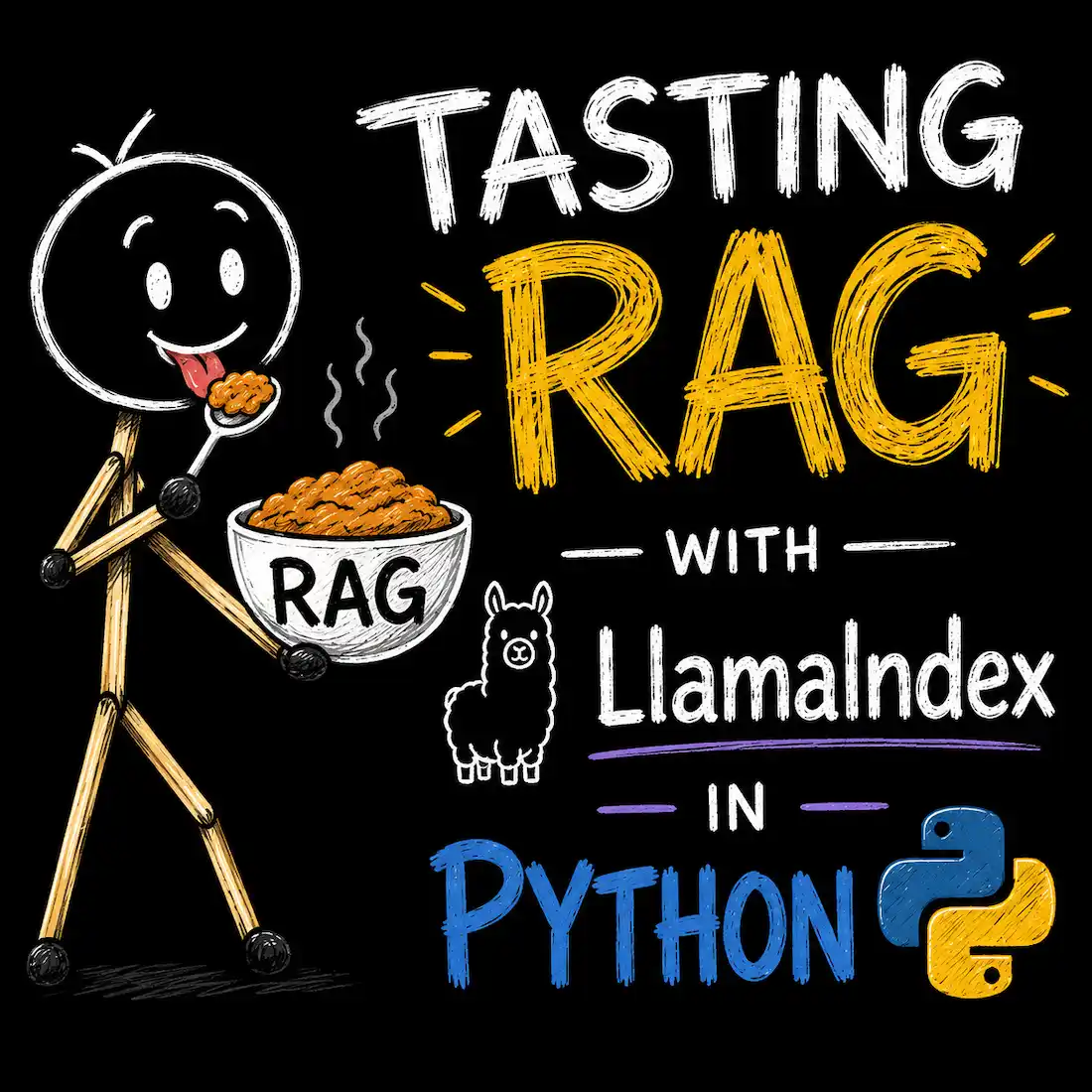
I previously built RAG in Next.js, handling chunking and vectorization step by step. This time, I wanted to explore Python instead. Python's library ecosystem is easier to work with and more flexible for different kinds of projects.
Today, I played with a Python library and built a basic RAG pipeline in under 10 lines of code.
This post is part tutorial, part running log of my thought process.
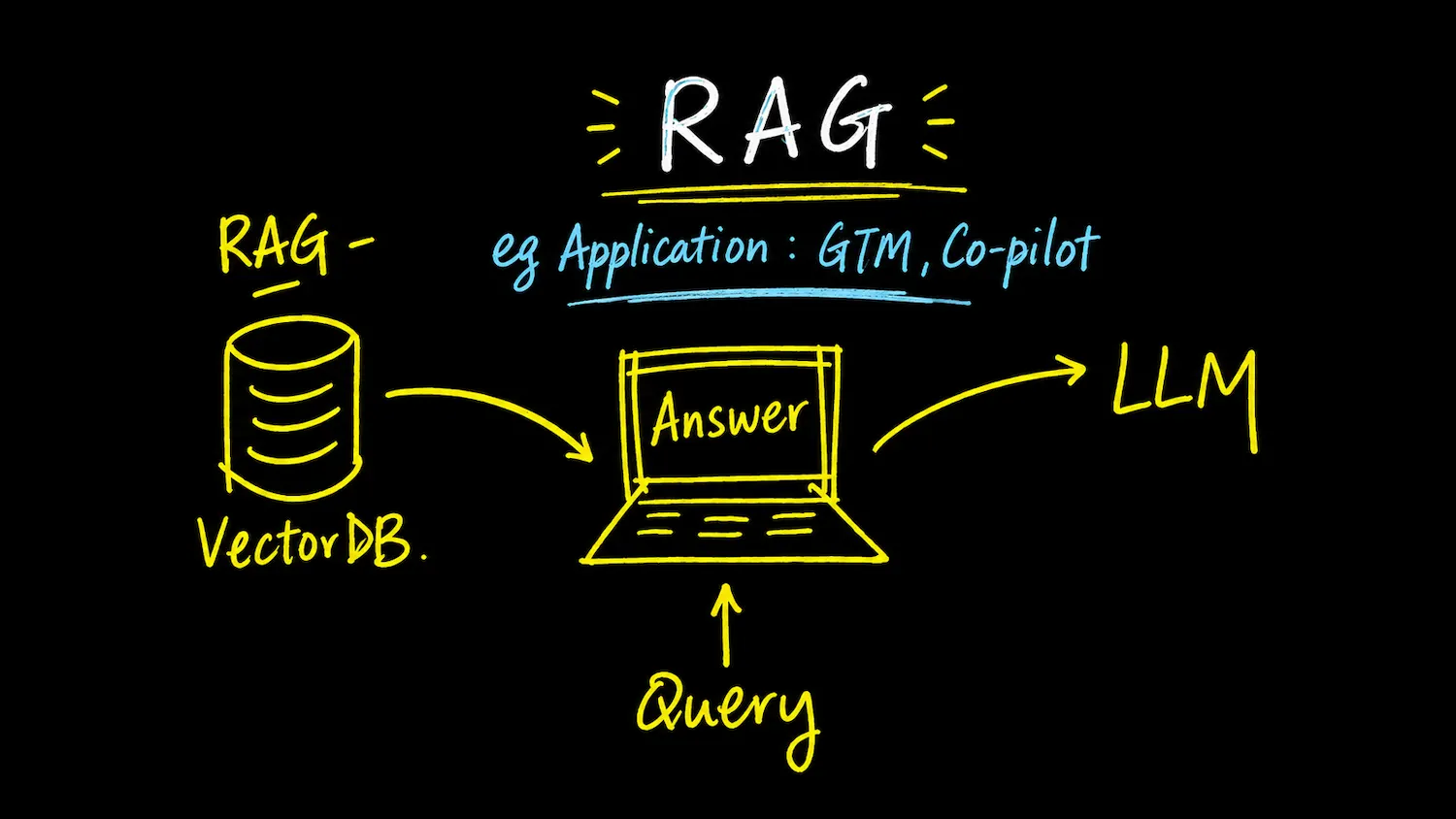
A RAG pipeline to be built in this article.
In this article:
- Why Python, Why LlamaIndex
- Setting Up the Project
- What We're Actually Building
- First Attempt: The Script
- First Test, I got serious AI Hallucination
- Trying to Fix the Bullet-Point Problem
- What's Actually Happening Behind the Scenes
- Solving the PDF and Word Problem: LlamaParse
- Persisting and Reusing the Index
- Final Thoughts
Why Python, Why LlamaIndex
Python is the dominant language for AI development and offers the most mature ecosystem for RAG. Two libraries kept coming up:
LlamaIndex
- Purpose-built for connecting external data to LLMs.
- Excellent out-of-the-box data connectors for PDFs, Notion, Slack, and more.
- Great for beginners. You can get a working RAG pipeline in under 10 lines of code.
- Highly customizable as your application grows more complex.
LangChain
- The most widely used framework for building any LLM-powered application.
- Massive ecosystem with hundreds of integrations for vector databases, models, and tools.
- Uses "LangChain Expression Language" (LCEL) to chain retrieval and generation steps together.
I chose LlamaIndex because my focus is strictly on data parsing, document search, and getting a RAG prototype running quickly.
I also decided to start with a single Python (.py) file rather than a web framework. Working from a plain script lets me test data loading, embedding, and LLM responses without fighting framework boilerplate. Once the pipeline works, I can move the logic into a Django view or a background task later.
Setting Up the Project
Here's the exact terminal workflow I used to set up the project directory and virtual environment.
Step 1: Create the Project Directory
mkdir python-rag-project
cd python-rag-project
Step 2: Create and Activate the Virtual Environment
python3 -m venv ragvenv
source ragvenv/bin/activate
Step 3: Upgrade Pip and Create the Script File
Always upgrade pip inside a fresh environment, then create a blank Python file and a data directory:
pip install --upgrade pip
touch rag_test.py
mkdir data
ls
Step 4: Install the RAG Libraries
Now install the packages inside the virtual environment:
pip install llama-index
code .
What We're Actually Building
Before writing any code, it helps to picture the flow: my laptop reads the documents and does the parsing and chunking locally, but the actual "understanding", i.e., turning text into embeddings, and generating answers, happens on OpenAI's servers.
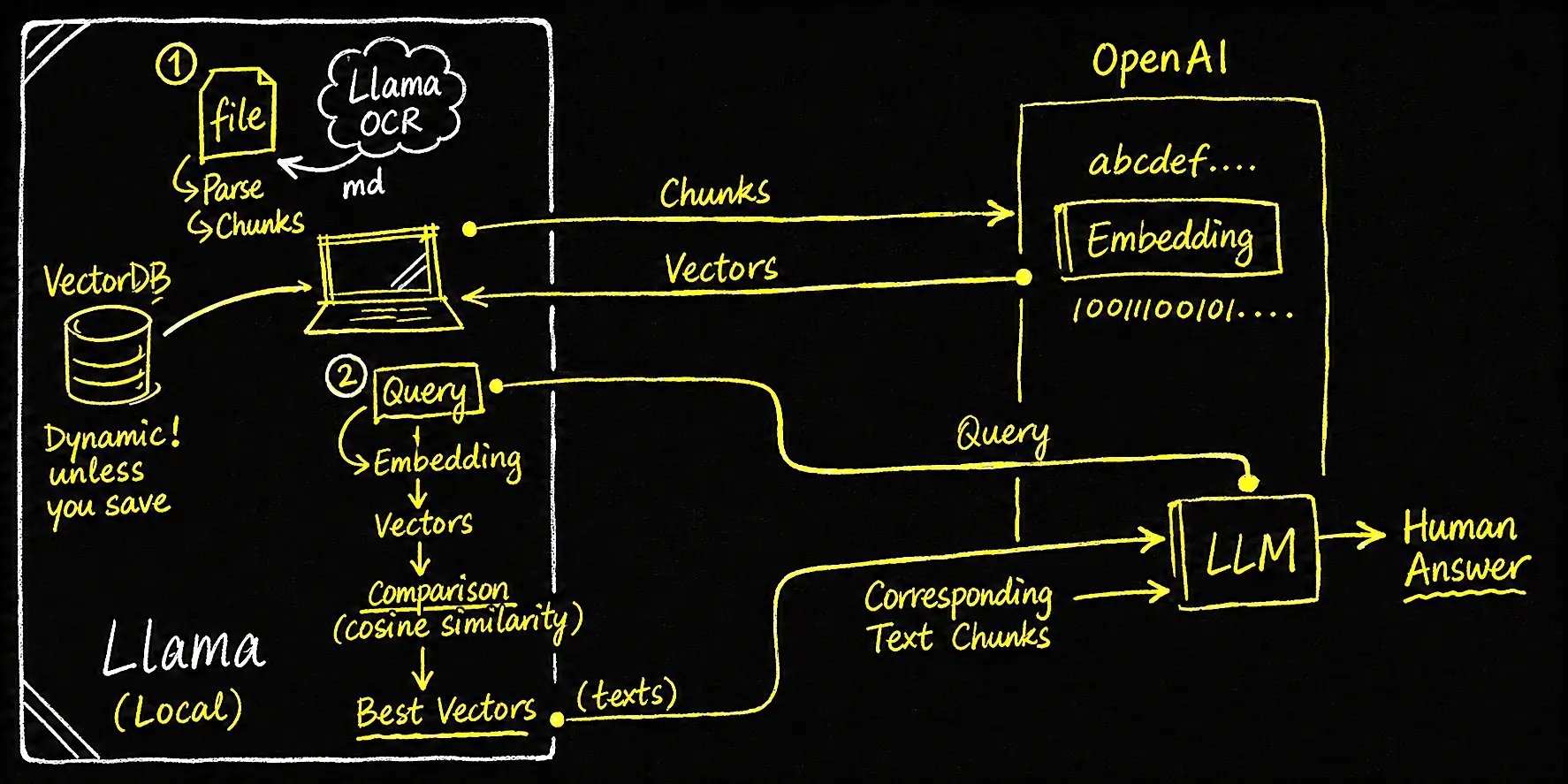
Diagram 2: the full flow -- what runs locally vs. what talks to OpenAI.
Looks complicated? No worries! LlamaIndex handles all of this for us under the hood. Awesome, right?
So before any of that magic happens, my script needs to authenticate itself with an OpenAI API key. Let's set that up safely first.
Getting an OpenAI API Key
- Go to the OpenAI API Keys page and log in (or create an account).
- Click Create new secret key.
- Copy the key immediately. OpenAI only shows it once.
Setting Up the .env File
Create a blank file named exactly .env (note the leading dot) in the project's root folder:
touch .envPaste your key inside it:
OPENAI_API_KEY=sk-proj-abc123xyz...Security Step: .gitignore
Before writing any code, it's worth protecting this key from accidentally being committed to Git:
touch .gitignoreI added the .env file, the data folder, and the virtual environment to .gitignore:
.env
data/
ragvenv/   # if the virtual environment lives inside the project folder
First Attempt: The Script
With the key in place, here's the first script:
from dotenv import load_dotenv
from llama_index.core import VectorStoreIndex, SimpleDirectoryReader

# 1. Load the API keys from the .env file
load_dotenv()

# 2. Load documents from the local /data directory
documents = SimpleDirectoryReader("data").load_data()

# 3. Automatically parse, embed, and index the data
index = VectorStoreIndex.from_documents(documents)

# 4. Create a query engine and ask a question
query_engine = index.as_query_engine()
response = query_engine.query("What does the document say about project deadlines?")
print(response)
Less than 10 lines of code. Right?
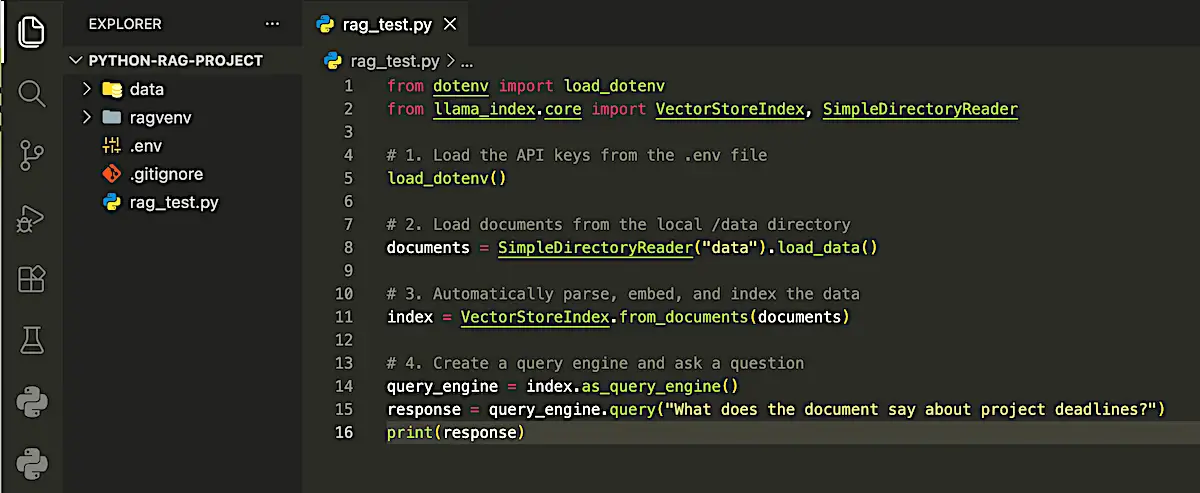
Less than 10 lines of code for a RAG system. Simple folder structure as a little 'project'
I dropped the documents directly into the data folder. SimpleDirectoryReader automatically detects file extensions and parses them using LlamaIndex's built-in readers.
What runs where: at this stage, everything, from reading the file, parsing it, to splitting it into chunks, happens locally on my MacBook. The only thing that leaves my machine is the embedding step: each chunk of text gets sent to OpenAI's API, and a vector representation comes back. Nothing is parsed in the cloud yet. That only happens once LlamaParse is introduced later. (The upper part of Diagram 2)
Once everything was set, I ran:
python rag_test.pyFirst Test, I got serious AI Hallucination
Put your question in line 15 of .py file.
Question: "What would be on the 1st Floor?"
Answer: "The 1st Floor would typically contain living spaces, such as bedrooms, bathrooms, a kitchen, and possibly a living room or dining area."
That's completely wrong for my case, as my document describes a commercial smart building with only a Ground Floor (G/F) and a Second Floor (2/F). There is no "1st Floor" in the source material at all.
This is a classic hallucination. Since the document never mentions a "1st Floor," the LLM fell back on its own general training knowledge to guess what a first floor "usually" contains, instead of sticking to the retrieved data.
Retry: "What would be on the Second Floor?"
Answer: "The Second Floor contains a variety of information related to the London Smart Hub Capstone Project, including data, project details, and possibly other relevant content."
Better! it at least picked up the project name, "London Smart Hub...". But the answer is still vague, which suggested the retrieval was reading the title and surrounding paragraphs, but not the bullet-point details underneath.
Trying to Fix the Bullet-Point Problem
This time, I use a MS Word document instead of a PDF. And I adjusted the query engine settings to retrieve more context and summarize across chunks:
from dotenv import load_dotenv
from llama_index.core import VectorStoreIndex, SimpleDirectoryReader

# 1. Load the API keys from my .env file
load_dotenv()

# 2. Load documents from the local /data directory
documents = SimpleDirectoryReader("data").load_data()

# 3. Automatically parse, embed, and index the data
index = VectorStoreIndex.from_documents(documents)

# 4. Create a query engine and ask a question
query_engine = index.as_query_engine(
    similarity_top_k=5,
    response_mode="tree_summarize"
)
response = query_engine.query("List all the bullet points under the Second Floor section.")
print(response)
I asked a question as simple as that:
Question: List all the bullet points under the Second Floor section.
Result:
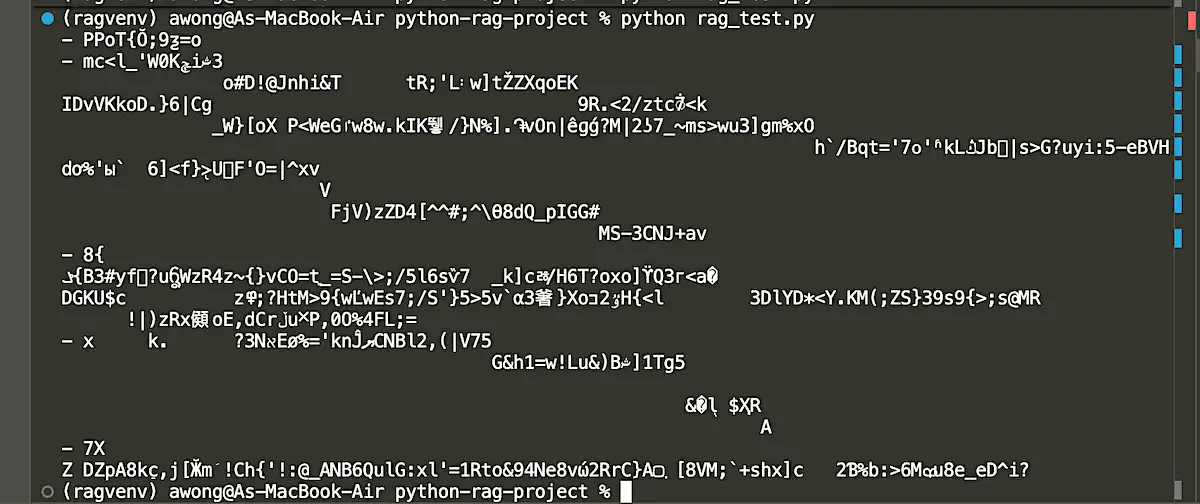
No wonder! It does not read PDF or DOCX at ALL!
OK, I try MD directly this time. I have this document as a Markdown file:
# London Smart Hub Project Charter

## Project Aim

The core purpose of this project is to develop a 100,000 sq ft, two-storey commercial facility in London, Ontario that integrates climate-controlled storage, shared workspace, and small office suites.

## Building Layout and Facilities

The facility features a total gross floor area divided equally across two storeys:

### Ground Floor Facilities

- High-access storage units
- Executive storage units
- Main reception and administrative area
- Dedicated loading zones

### Second Floor Facilities

- Climate-controlled storage units
- Executive storage units
- Dedicated office suites
- Co-working space and shared amenities
Here's the actual answer I got back when running the query "What is the facility mentioned?" against the Markdown version of the document:
"The facility mentioned in the document includes high-access storage units, executive storage units, main reception and administrative area, dedicated loading zones on the ground floor, and climate-controlled storage units, executive storage units, dedicated office suites, co-working space, and shared amenities on the second floor."
That's a real, structured answer pulling correctly from both floors with those bullet points included. Night and day compared to the messy PDF result above.
Turns out the root cause wasn't the query settings at all. It was the source file itself:
- PDF → parsing was broken; bullet points were lost.
- MS Word (.docx) → also failed to parse properly.
- Markdown (.md) → worked correctly.
So in this most basic setup, only the Markdown file parsed cleanly. PDF and Word documents did not.
But in real projects, I need a solution to turn my PDF and Word documents into clean Markdown before feeding them into the pipeline. There are many tools out there for this. I'll start by trying LlamaCloud.
What's Actually Happening Behind the Scenes
Before going further on handling PDF and Word documents, it's worth pausing to map out what's actually happening at each step, especially since it wasn't obvious to me at first which parts run on my machine and which parts talk to OpenAI. This is the same flow shown in the diagram earlier.
The RAG Flow, Step by Step
What runs locally vs. what talks to OpenAI
- Parse (local): The file is read and split into chunks entirely on my machine, using
SimpleDirectoryReader's built-in parser (this is the step that broke for PDF/DOCX above). - Embed (round-trip to OpenAI): Each text chunk is sent to OpenAI's embedding model, which returns a vector (a list of numbers representing that chunk's meaning). This happens once, at indexing time.
- Store (local): Those vectors are saved in a local Vector DB in memory by default, or on disk if I call
persist(). - Query (local + round-trip): My question is embedded the same way, then compared locally against every stored vector using cosine similarity. No API call is needed for this comparison. The best-matching chunks are identified locally.
- Answer (round-trip to OpenAI): The original text of those best-matching chunks (not the vectors themselves) is sent to the LLM along with my question, and the human-readable answer comes back.
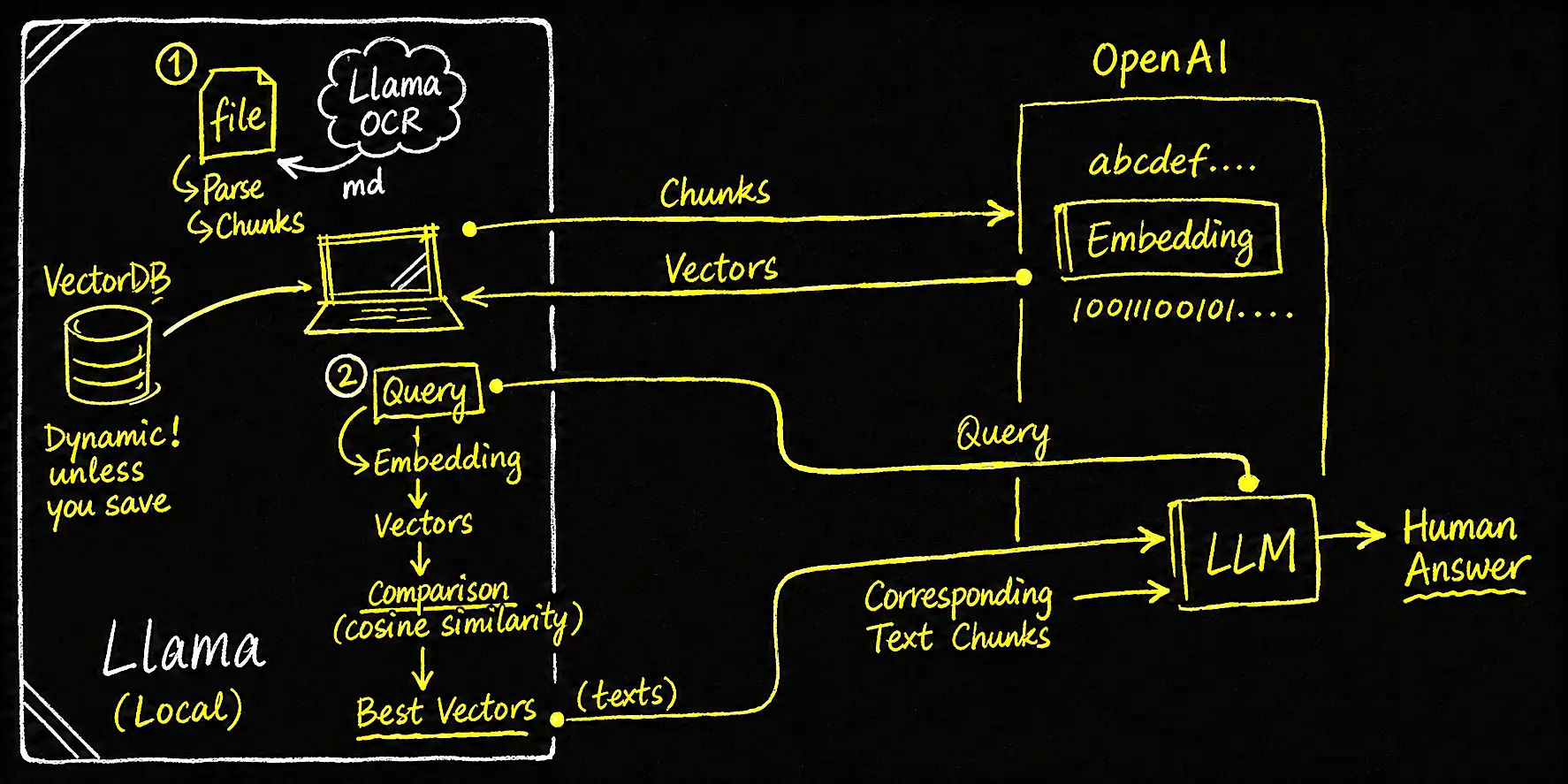
So only two things ever leave my machine: the raw text chunks (for embedding) and the retrieved text + question (for the final answer). Everything else, parsing, chunking, similarity search, storage, happens locally.
So, How Do I Handle PDF and Word Files?
Given that step 1 (Parse) is where things fell apart, for example, pypdf and docx2txt, couldn't reliably extract bullet points and layout from my PDF and Word files. The fix has to happen at that exact step, before any chunking or embedding takes place. That's where LlamaParse comes in.
Solving the PDF and Word Problem: LlamaParse
Since PDFs and Word docs weren't parsing correctly on their own, the next step was to use LlamaParse, which uses cloud-based OCR to convert PDFs into clean, structured text.
In short: LlamaParse's only job is to swap out step 1. Instead of my laptop's basic local parser trying (and failing) to read the file's layout, the file is sent to LlamaCloud, where an AI-based OCR model reads the visual layout and converts it into clean Markdown text, as shown near the "file" on the top left of Diagram 2. Everything from step 2 onward (embed, store, query, answer) runs exactly the same as before.
Get a Free LlamaCloud API Key
- Log into the LlamaCloud Dashboard.
- Click API Key in the left sidebar.
- Click Generate New Key and copy it.
- Open your
.envfile and add the new key underneath your OpenAI key:
OPENAI_API_KEY=sk-proj-abc123xyz...
LLAMA_CLOUD_API_KEY=llx-llama-cloud-key-here...
Install the LlamaParse reader:
pip install llama-index-readers-llama-parseUpdated Script with LlamaParse
from dotenv import load_dotenv
from llama_index.core import VectorStoreIndex, SimpleDirectoryReader
import os
from llama_index.readers.llama_parse import LlamaParse

# 1. Load the API keys from the .env file
load_dotenv()

# 2. Load documents from the local /data directory
# LlamaParse parses the PDF in the cloud and returns clean, RAG-ready text
parser = LlamaParse(
    api_key=os.getenv("LLAMA_CLOUD_API_KEY"),
    result_type="text"  # Returns structured Markdown-style text from the cloud
)
file_extractor = {".pdf": parser}
documents = SimpleDirectoryReader("data", file_extractor=file_extractor).load_data()

# 3. Automatically parse, embed, and index the data
index = VectorStoreIndex.from_documents(documents)

# 4. Create a query engine and ask a question
query_engine = index.as_query_engine()
response = query_engine.query("What is the aim of this project?")
print(response)
Tested with the same Word file by asking "What is the aim of this project?"
Results: The aim of this project is to consolidate storage and workspace functions into a single, professionally managed 100,000 sq. ft. facility, integrating various types of storage and office spaces to cater to the needs of small businesses, entrepreneurs, and mobile professionals in London, Ontario.
Perfect!
Question: "What are the facilities in 2/F?"
Results:

What happens on LlamaCloud vs. locally:
- On LlamaCloud (the cloud part): the PDF is uploaded, an AI-based OCR/layout model reads it, converts the visual layout into clean Markdown text, and sends that text back. Then removes the file from its queue. That's the entire cloud job: PDF/DOCX in, clean Markdown out.
- Back on my laptop (everything else): the returned Markdown text is structured into
Documentchunks, split, sent to OpenAI for embedding, and stored as the same steps 2–5 described earlier (Diagram 2).
This is a basic but complete RAG System.
Persisting and Reusing the Index
Persisting the Index Locally
To avoid re-embedding every time, I added this line to save the index to disk, between Steps 3 and 4 in the code:
...

# 3. Automatically parse, embed, and index your data
index = VectorStoreIndex.from_documents(documents)

# ─── NEW LINE: Save the data onto your Mac's hard drive ───
index.storage_context.persist(persist_dir="./storage")
print("Success! Your RAG content has been saved to the './storage' folder.")


# 4. Create a query engine and ask a question
query_engine = index.as_query_engine()

...
Reusing the Saved Index (Next Run)
Once the index is persisted, I don't need to re-load and re-embed the documents every time. That would waste time and repeat the OpenAI API cost. Instead, a new script can load the saved index directly from disk:
from dotenv import load_dotenv
from llama_index.core import StorageContext, load_index_from_storage

load_dotenv()

# Load the previously saved index instead of re-embedding documents
storage_context = StorageContext.from_defaults(persist_dir="./storage")
index = load_index_from_storage(storage_context)

query_engine = index.as_query_engine()
response = query_engine.query("What is the aim of this project?")
print(response)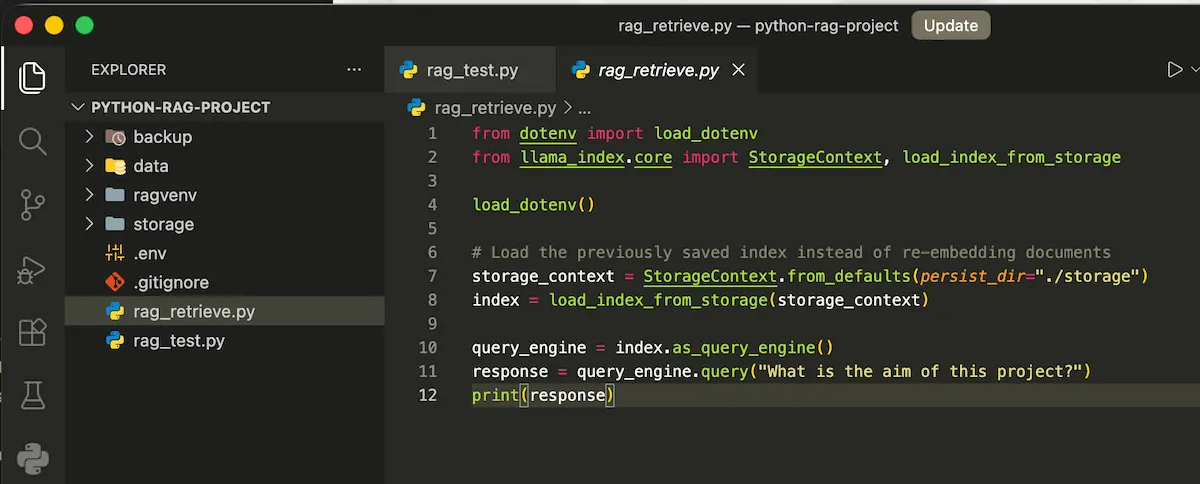
Python code for retrieving what is stored in the vector database. This avoids the repetition of step 1 & 2.
This skips the Step 1 - SimpleDirectoryReader and the Step 2 - the embedding step entirely, as long as the source documents haven't changed.
✅ Tested and confirmed working -- running this in a separate script successfully loaded the saved index and answered a query, with no re-parsing or re-embedding needed.
You can also peek into the Vector Database. Explore the docstore.json and search for text field.
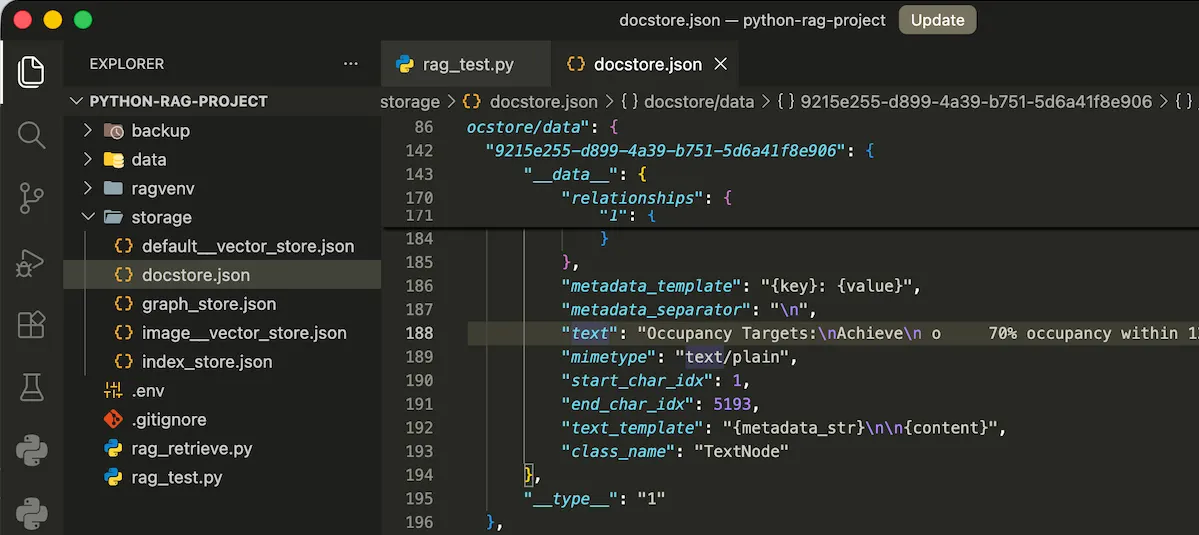
Peek inside the Vector Database.
Final Thoughts
Honestly, this whole thing started because I wanted to see if Python is just easier for RAG than TypeScript/Next.js, which is what I'd been building with before. Still figuring things out as I go. Next up is playing with chunking strategies, retrieval tuning, and putting LlamaIndex head-to-head with LangChain. Always happy to nerd out about RAG with anyone else poking around in this space, so feel free to reach out if you're working on something similar!

![[8-Day Closmore SaaS Challenge] Day 5-6 — "What If...?"](/media/postuploads/error-handling-code-for-Closmore-SaaS-Day-5-6-What-if-audit-1.jpg)